GitHub Actions
This guide shows you how to create and delete Prisma Postgres databases from GitHub Actions with the Prisma CLI. The workflow provisions a database for every pull request, applies your checked-in migrations, seeds it with sample data, and leaves a comment on the pull request with the database name and status.
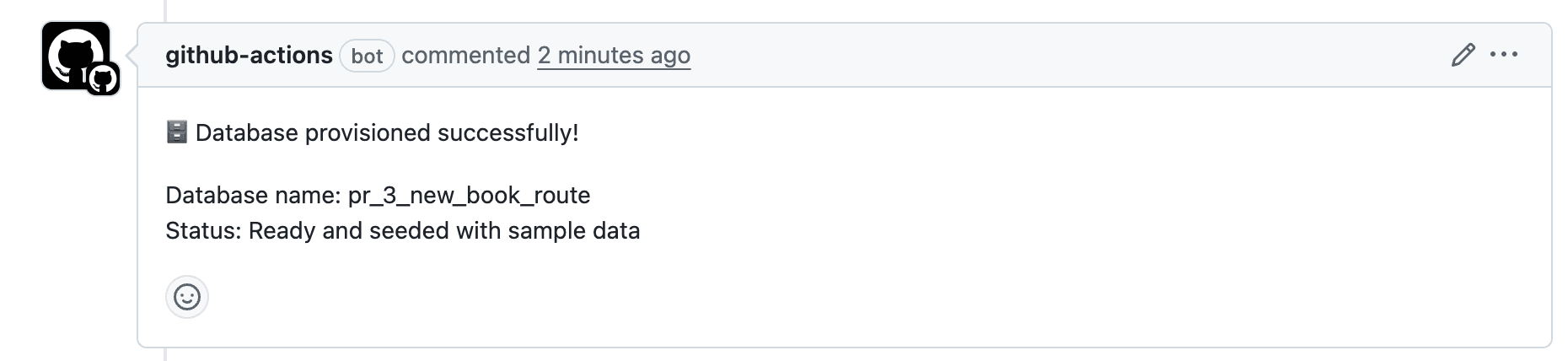
When the pull request is closed, the workflow deletes the database. Every pull request gets its own isolated database, so migrations and data changes can be tested without touching a shared development database.
The project setup, migrations, seed script, and the postgres create, postgres list, and postgres connection create commands below were run against a live Prisma Postgres database. The workflow file is assembled from those commands.
- Node.js 24 or later
- A Prisma Data Platform account
- A GitHub repository
jq, to read the CLI's JSON output (GitHub-hosted runners have it preinstalled)
To delegate this guide to your coding agent, copy the prompt below and hand it over:
Set up per-pull-request Prisma Postgres databases for this project with GitHub Actions and Prisma ORM.

1. Add Prisma ORM to the project with `npx prisma@latest orm init --yes --target postgres --authoring psl` (run it after a lockfile exists), then run `npx prisma@latest init` so the Prisma agent skills are installed and stay current, and use them. Define User and Post models in `src/prisma/contract.prisma`, run `npx prisma contract emit`, then `npx prisma migration plan --name init` and `npx prisma db migrate` against the DATABASE_URL I give you (or one from `npx create-db@latest`).

2. Write `src/prisma/seed.ts` that creates two users with posts through `db.orm.public.User.create` and `db.orm.public.Post.create`, skips when users already exist (use `.aggregate((a) => ({ total: a.count() }))`, not `.count()`), and ends with `await db.close()`. Add a `seed` script and verify `npm run seed` works twice.

3. Check `npx prisma auth whoami`; if I am not signed in, stop and ask me to run `npx prisma auth login`. Create a dedicated platform project with `npx prisma project create <name>` and show me the project id.

4. Write `.github/workflows/prisma-postgres-preview.yml` following https://www.prisma.io/docs/guides/integrations/github-actions.md: a provision job that finds or creates a database named after the pull request with `npx prisma postgres list|create --project "$PRISMA_PROJECT_ID" --json`, reads `.envelope.result.connectionString` with jq, runs `db migrate --db`, `db verify --db`, and `npm run seed`, then comments on the pull request; and a cleanup job that deletes the database with `postgres delete <id> --confirm <id>` when the pull request closes. Always pass `--project`; the CLI does not read PRISMA_PROJECT_ID from the environment for these commands.

5. Tell me which GitHub secrets to add: PRISMA_SERVICE_TOKEN, PRISMA_WORKSPACE_ID, PRISMA_PROJECT_ID.Create a project and make it an ES module:
mkdir prisma-gha-demo && cd prisma-gha-demo

bun init

npm pkg set type module

# couldn't auto-convert command

bun installmkdir prisma-gha-demo && cd prisma-gha-demo
pnpm init
npm pkg set type=module
# couldn't auto-convert command
pnpm installmkdir prisma-gha-demo && cd prisma-gha-demo
yarn init
npm pkg set type=module
# couldn't auto-convert command
yarn installmkdir prisma-gha-demo && cd prisma-gha-demo
npm init
npm pkg set type=module
npm installThe empty npm install writes a package-lock.json. orm init picks the package manager from the lockfile it finds, so creating one first keeps the setup on npm.
The empty npm install writes a package-lock.json. orm init picks the package manager from the lockfile it finds, so creating one first keeps the setup on npm.
In this step you add Prisma ORM to the project, define the data model, create the first migration, and seed the database locally. Everything you do here runs again inside GitHub Actions in step 4, against a fresh database.
bunx prisma@latest orm init --yes --target postgres --authoring pslpnpm dlx prisma@latest orm init --yes --target postgres --authoring pslyarn dlx prisma@latest orm init --yes --target postgres --authoring pslnpx prisma@latest orm init --yes --target postgres --authoring pslThis writes prisma.config.ts, src/prisma/contract.prisma, src/prisma/db.ts, .env.example, tsconfig.json, and prisma-8.md, installs @prisma/orm-postgres and dotenv plus the prisma, @types/node, and @prisma/cli-engine dev dependencies, and emits src/prisma/contract.json and src/prisma/contract.d.ts.
Those two emitted files are the whole client. There is no generated client package, no prisma generate, and no driver adapter to install: the runtime in src/prisma/db.ts reads contract.json and connects with the DATABASE_URL it finds in .env.
import 'dotenv/config';
import postgres from '@prisma/orm-postgres/runtime';
import type { Contract } from './contract.d';
import contractJson from './contract.json' with { type: 'json' };

export const db = postgres<Contract>({
  contractJson,
  url: process.env['DATABASE_URL']!,
});
This writes prisma.config.ts, src/prisma/contract.prisma, src/prisma/db.ts, .env.example, tsconfig.json, and prisma-8.md, installs @prisma/orm-postgres and dotenv plus the prisma, @types/node, and @prisma/cli-engine dev dependencies, and emits src/prisma/contract.json and src/prisma/contract.d.ts.
Those two emitted files are the whole client. There is no generated client package, no prisma generate, and no driver adapter to install: the runtime in src/prisma/db.ts reads contract.json and connects with the DATABASE_URL it finds in .env.
import 'dotenv/config';

import postgres from '@prisma/orm-postgres/runtime';

import type { Contract } from './contract.d';

import contractJson from './contract.json' with { type: 'json' };

export const db = postgres<Contract>({

  contractJson,

  url: process.env['DATABASE_URL']!,

});orm init starts you with User and Post models. Add a published flag to Post:
// use prisma-8

model User {

  id        Int      @id @default(autoincrement())

  email     String   @unique

  username  String?

  name      String?

  posts     Post[]

  createdAt TimestamptzString @default(now())

  updatedAt temporal.updatedAtString()

}

model Post {

  id        Int      @id @default(autoincrement())

  title     String

  content   String?

  published Boolean  @default(false)

  author    User     @relation(fields: [authorId], references: [id])

  authorId  Int

  createdAt TimestamptzString @default(now())

  updatedAt temporal.updatedAtString()

}
Emit the contract again so contract.json and the types match:
bunx prisma contract emitpnpm prisma contract emityarn prisma contract emitnpx prisma contract emit✔ Emitted contract.json and contract.d.ts
storageHash: 0c3a18eb65d5a5027c444cf0626d843cdb41dfd5fe8e66d6fce8d2eab460c971
executionHash: 796fa270d853489edb1c3e0d332d596412292127a259b856b495a498c752882a
profileHash: 3916f444a8a17ad749191acf9e08dad97d1a327b88c2f1d45d12f240296aa8b2✔ Emitted contract.json and contract.d.ts
storageHash: 0c3a18eb65d5a5027c444cf0626d843cdb41dfd5fe8e66d6fce8d2eab460c971
executionHash: 796fa270d853489edb1c3e0d332d596412292127a259b856b495a498c752882a
profileHash: 3916f444a8a17ad749191acf9e08dad97d1a327b88c2f1d45d12f240296aa8b2Copy .env.example to .env and set DATABASE_URL to a PostgreSQL database you can use for development. A local PostgreSQL works, or create a Prisma Postgres database with npx create-db@latest and paste the connection string it prints:
DATABASE_URL="postgres://user:password@localhost:5432/prisma_gha_demo"prisma.config.ts loads .env, so every CLI command below reads this value. The workflow overrides it per run with --db.
The workflow applies migrations that are committed to the repository, so create the first one now:
bunx prisma migration plan --name initpnpm prisma migration plan --name inityarn prisma migration plan --name initnpx prisma migration plan --name init✔ Planned 6 operation(s)
migrations/app/20260910T1549_init
├─ Create schema "public"
├─ Create table "Post"
├─ Create table "User"
├─ Add unique constraint on "User" (email)
├─ Create index "Post_authorId_idx_e47547ed" on "Post"
└─ Add foreign key "Post_authorId_fkey" on "Post"
from: (baseline)
to: 0c3a18eb65d5a5027c444cf0626d843cdb41dfd5fe8e66d6fce8d2eab460c971
app space: migrations/app/20260910T1549_initmigration plan is offline. It writes a migration directory under migrations/app/ and prints a DDL preview; it does not touch the database. Apply it to your development database:
✔ Planned 6 operation(s)

migrations/app/20260910T1549_init
├─ Create schema "public"
├─ Create table "Post"
├─ Create table "User"
├─ Add unique constraint on "User" (email)
├─ Create index "Post_authorId_idx_e47547ed" on "Post"
└─ Add foreign key "Post_authorId_fkey" on "Post"

from:       (baseline)
to:         0c3a18eb65d5a5027c444cf0626d843cdb41dfd5fe8e66d6fce8d2eab460c971
app space:  migrations/app/20260910T1549_init
migration plan is offline. It writes a migration directory under migrations/app/ and prints a DDL preview; it does not touch the database. Apply it to your development database:
bunx prisma db migratepnpm prisma db migrateyarn prisma db migratenpx prisma db migrate✔ Applied 1 migration(s) (6 operation(s)) across 1 contract space(s)
App space
├─ Create schema "public"
├─ Create table "Post"
├─ Create table "User"
├─ Add unique constraint on "User" (email)
├─ Create index "Post_authorId_idx_e47547ed" on "Post"
├─ Add foreign key "Post_authorId_fkey" on "Post"
└─ marker 0c3a18eb65d5a5027c444cf0626d843cdb41dfd5fe8e66d6fce8d2eab460c971Commit the migrations/ directory. Whenever you change the contract, run contract emit, migration plan --name <change>, and db migrate again; the pull request's database then receives exactly the migrations the pull request adds. See How migrations work for the full loop.
✔ Applied 1 migration(s) (6 operation(s)) across 1 contract space(s)

App space
├─ Create schema "public"
├─ Create table "Post"
├─ Create table "User"
├─ Add unique constraint on "User" (email)
├─ Create index "Post_authorId_idx_e47547ed" on "Post"
├─ Add foreign key "Post_authorId_fkey" on "Post"
└─ marker 0c3a18eb65d5a5027c444cf0626d843cdb41dfd5fe8e66d6fce8d2eab460c971
Commit the migrations/ directory. Whenever you change the contract, run contract emit, migration plan --name <change>, and db migrate again; the pull request's database then receives exactly the migrations the pull request adds. See How migrations work for the full loop.
Create src/prisma/seed.ts. Prisma ORM writes take one row at a time and return the inserted row, so create each user, then create its posts with the returned id:
import { db } from "./db.ts";

const users = [

  {

    name: "Alice",

    email: "alice@prisma.io",

    posts: [

      { title: "Join the Prisma Discord", content: "https://pris.ly/discord", published: true },

      { title: "Prisma on YouTube", content: "https://pris.ly/youtube", published: false },

    ],

  },

  {

    name: "Bob",

    email: "bob@prisma.io",

    posts: [

      { title: "Follow Prisma on Twitter", content: "https://twitter.com/prisma", published: true },

    ],

  },

];

async function main() {

  const { total } = await db.orm.public.User.aggregate((a) => ({ total: a.count() }));

  if (total > 0) {

    console.log(`Database already has ${total} users, skipping seed`);

    return;

  }

  for (const { posts, ...user } of users) {

    const created = await db.orm.public.User.create(user);

    for (const post of posts) {

      await db.orm.public.Post.create({ ...post, authorId: created.id });

    }

    console.log(`Seeded ${created.email} with ${posts.length} posts`);

  }

}

main()

  .catch((error) => {

    console.error(error);

    process.exitCode = 1;

  })

  .finally(() => db.close());
The guard at the top makes the script safe to run twice, which matters when a pull request is reopened and the workflow runs against a database that already has data. The db.close() at the end releases the connection pool; without it the process keeps running after the seed finishes.
Add a script for it:
{

  "scripts": {

    "contract:emit": "prisma contract emit",

    "seed": "node src/prisma/seed.ts"

  }

}
Node.js 24 runs the TypeScript file directly. Run it:
bun run seedpnpm run seedyarn seednpm run seedSeeded alice@prisma.io with 2 posts
Seeded bob@prisma.io with 1 postsRun it again and the guard reports Database already has 2 users, skipping seed.
To check the data, put a query in query.ts and run it with node query.ts:
import { db } from "./src/prisma/db.ts";
const users = await db.orm.public.User.select("id", "email", "name")
.include("posts", (post) => post.select("title", "published"))
.all();
console.log(JSON.stringify(users, null, 2));
await db.close();[
{
"id": 1,
"email": "alice@prisma.io",
"name": "Alice",
"posts": [
{ "title": "Join the Prisma Discord", "published": true },
{ "title": "Prisma on YouTube", "published": false }
]
},
{
"id": 2,
"email": "bob@prisma.io",
"name": "Bob",
"posts": [{ "title": "Follow Prisma on Twitter", "published": true }]
}
]The project now works locally. Next, set up the platform side that the workflow will drive.
Seeded alice@prisma.io with 2 posts
Seeded bob@prisma.io with 1 posts
Run it again and the guard reports Database already has 2 users, skipping seed.
To check the data, put a query in query.ts and run it with node query.ts:
import { db } from "./src/prisma/db.ts";

const users = await db.orm.public.User.select("id", "email", "name")
  .include("posts", (post) => post.select("title", "published"))
  .all();
console.log(JSON.stringify(users, null, 2));
await db.close();[
{
"id": 1,
"email": "alice@prisma.io",
"name": "Alice",
"posts": [
{ "title": "Join the Prisma Discord", "published": true },
{ "title": "Prisma on YouTube", "published": false }
]
},
{
"id": 2,
"email": "bob@prisma.io",
"name": "Bob",
"posts": [{ "title": "Follow Prisma on Twitter", "published": true }]
}
]The project now works locally. Next, set up the platform side that the workflow will drive.
3. Create a platform project for preview databases
Section titled “3. Create a platform project for preview databases”The Prisma CLI manages Prisma Postgres databases with the postgres commands. Databases live inside a platform project, so create a dedicated project for the workflow. That keeps preview databases away from your development databases and gives the workflow a single project id to target.
Sign in once (it opens a browser):
bunx prisma auth loginpnpm prisma auth loginyarn prisma auth loginnpx prisma auth loginCreate the project from your project directory:
bunx prisma project create prisma-gha-previewpnpm prisma project create prisma-gha-previewyarn prisma project create prisma-gha-previewnpx prisma project create prisma-gha-previewThis creates the project in your workspace and links the directory to it by writing .prisma/local.json, which it also adds to .gitignore. Show the link to get the project id:
This creates the project in your workspace and links the directory to it by writing .prisma/local.json, which it also adds to .gitignore. Show the link to get the project id:
bunx prisma project showpnpm prisma project showyarn prisma project shownpx prisma project showℹ This directory is linked to the following platform project.
local repo: ~/prisma-gha-demo
platform: Prisma Sandbox / prisma-gha-preview
url: https://api.prisma.io/v1/projects/proj_abc123def456The proj_... segment at the end of the URL is the project id. Keep it; you store it as a GitHub secret in step 6.
Now try the exact commands the workflow runs. Create a database and ask for JSON output:
ℹ This directory is linked to the following platform project.
local repo: ~/prisma-gha-demo
platform: Prisma Sandbox / prisma-gha-preview
url: https://api.prisma.io/v1/projects/proj_abc123def456The proj_... segment at the end of the URL is the project id. Keep it; you store it as a GitHub secret in step 6.
Now try the exact commands the workflow runs. Create a database and ask for JSON output:
bunx prisma postgres create pr-test --project proj_abc123def456 --jsonpnpm prisma postgres create pr-test --project proj_abc123def456 --jsonyarn prisma postgres create pr-test --project proj_abc123def456 --jsonnpx prisma postgres create pr-test --project proj_abc123def456 --json{
"kind": "result",
"envelope": {
"ok": true,
"commandId": "postgres.create",
"result": {
"projectId": "proj_abc123def456",
"projectName": "prisma-gha-preview",
"database": {
"id": "db_abc123def456",
"name": "pr-test",
"region": "us-east-1",
"status": "ready"
},
"connection": { "id": "con_abc123def456", "name": "Prisma Postgres API Key" },
"connectionString": "postgres://<credentials>@pooled.db.prisma.io:5432/postgres?sslmode=require"
}
}
}The connection string is shown once, in this result, and never again. In --json mode every command prints newline-delimited events and ends with one "kind": "result" line whose envelope carries ok, result, and on failure error.code. The workflow reads the connection string with jq from that line. Apply the migration and seed the new database by passing the connection string explicitly:
export PREVIEW_URL="<the connectionString from above>"
npx prisma db migrate --db "$PREVIEW_URL"
npx prisma db verify --db "$PREVIEW_URL"
DATABASE_URL="$PREVIEW_URL" npm run seed✔ Applied 1 migration(s) (6 operation(s)) across 1 contract space(s)
✔ Database marker and schema match contract
Seeded alice@prisma.io with 2 posts

Seeded bob@prisma.io with 1 posts--db overrides the DATABASE_URL from .env for the CLI, and the environment variable in front of npm run seed does the same for the seed script.
List the project's databases to see it:
{
  "kind": "result",
  "envelope": {
    "ok": true,
    "commandId": "postgres.create",
    "result": {
      "projectId": "proj_abc123def456",
      "projectName": "prisma-gha-preview",
      "database": {
        "id": "db_abc123def456",
        "name": "pr-test",
        "region": "us-east-1",
        "status": "ready"
      },
      "connection": { "id": "con_abc123def456", "name": "Prisma Postgres API Key" },
      "connectionString": "postgres://<credentials>@pooled.db.prisma.io:5432/postgres?sslmode=require"
    }
  }
}
The connection string is shown once, in this result, and never again. In --json mode every command prints newline-delimited events and ends with one "kind": "result" line whose envelope carries ok, result, and on failure error.code. The workflow reads the connection string with jq from that line. Apply the migration and seed the new database by passing the connection string explicitly:
export PREVIEW_URL="<the connectionString from above>"
npx prisma db migrate --db "$PREVIEW_URL"
npx prisma db verify --db "$PREVIEW_URL"
DATABASE_URL="$PREVIEW_URL" npm run seed✔ Applied 1 migration(s) (6 operation(s)) across 1 contract space(s)
✔ Database marker and schema match contract
Seeded alice@prisma.io with 2 posts
Seeded bob@prisma.io with 1 posts--db overrides the DATABASE_URL from .env for the CLI, and the environment variable in front of npm run seed does the same for the seed script.
List the project's databases to see it:
bunx prisma postgres list --project proj_abc123def456pnpm prisma postgres list --project proj_abc123def456yarn prisma postgres list --project proj_abc123def456npx prisma postgres list --project proj_abc123def456project: prisma-gha-preview
Name Branch Region Status Id
pr-test br_abc123def456 us-east-1 ready db_abc123def456Deleting a database is destructive, so postgres delete asks you to type the database id. In a script there is nobody to type it, so pass it with --confirm:
project:  prisma-gha-preview

Name     Branch                       Region     Status  Id
pr-test  br_abc123def456  us-east-1  ready   db_abc123def456
Deleting a database is destructive, so postgres delete asks you to type the database id. In a script there is nobody to type it, so pass it with --confirm:
bunx prisma postgres delete db_abc123def456 --project proj_abc123def456 --confirm db_abc123def456pnpm prisma postgres delete db_abc123def456 --project proj_abc123def456 --confirm db_abc123def456yarn prisma postgres delete db_abc123def456 --project proj_abc123def456 --confirm db_abc123def456npx prisma postgres delete db_abc123def456 --project proj_abc123def456 --confirm db_abc123def456Without --confirm, a non-interactive run stops with CLI.CONSENT_REQUIRED and tells you the exact token to pass. The delete itself did not complete while validating this guide (the platform returned a server error for every delete that day), so no success output is shown.
Without --confirm, a non-interactive run stops with CLI.CONSENT_REQUIRED and tells you the exact token to pass. The delete itself did not complete while validating this guide (the platform returned a server error for every delete that day), so no success output is shown.
In this step you set up a GitHub Actions workflow that provisions a Prisma Postgres database when a pull request is opened, reopened, or updated, and deletes it when the pull request is closed.
mkdir -p .github/workflows

touch .github/workflows/prisma-postgres-preview.yml
The workflow:
- Finds or creates a database named after the pull request
- Applies the repository's migrations with
db migrateand checks them withdb verify - Seeds the database
- Comments on the pull request
- Deletes the database when the pull request is closed
- Supports manual runs for both provisioning and cleanup
Paste the following into .github/workflows/prisma-postgres-preview.yml. It sets the triggers, the secrets the CLI reads, and the raw database name:
name: Prisma Postgres preview database

on:

  pull_request:

    types: [opened, reopened, synchronize, closed]

  workflow_dispatch:

    inputs:

      action:

        description: "Action to perform"

        required: true

        default: "provision"

        type: choice

        options:

          - provision

          - cleanup

      database_name:

        description: "Database name (optional, sanitized before use)"

        required: false

        type: string

env:

  PRISMA_SERVICE_TOKEN: ${{ secrets.PRISMA_SERVICE_TOKEN }}

  PRISMA_WORKSPACE_ID: ${{ secrets.PRISMA_WORKSPACE_ID }}

  PRISMA_PROJECT_ID: ${{ secrets.PRISMA_PROJECT_ID }}

  PRISMA_POSTGRES_REGION: us-east-1

  RAW_DB_NAME: ${{ github.event.pull_request.number != null && format('pr-{0}-{1}', github.event.pull_request.number, github.event.pull_request.head.ref) || (inputs.database_name != '' && inputs.database_name || format('test-{0}', github.run_number)) }}

concurrency:

  group: ${{ github.workflow }}-${{ github.ref }}

  cancel-in-progress: true
PRISMA_SERVICE_TOKEN and PRISMA_WORKSPACE_ID are how the CLI authenticates without a browser: with those two variables set, every platform command in the job runs as the service token. PRISMA_PROJECT_ID is passed to each command as --project, because the postgres commands do not pick the project up from the environment on their own.
Append the following under a jobs: key. The job installs dependencies, finds or creates the database, applies migrations, seeds, and comments on the pull request:
jobs:

  provision-database:

    if: (github.event_name == 'pull_request' && github.event.action != 'closed') || (github.event_name == 'workflow_dispatch' && inputs.action == 'provision')

    runs-on: ubuntu-latest

    permissions:

      contents: read

      pull-requests: write

    timeout-minutes: 15

    steps:

      - name: Checkout

        uses: actions/checkout@v4

      - name: Set up Node.js

        uses: actions/setup-node@v4

        with:

          node-version: "24"

          cache: "npm"

      - name: Install dependencies

        run: npm ci

      - name: Validate secrets

        run: |

          for name in PRISMA_SERVICE_TOKEN PRISMA_WORKSPACE_ID PRISMA_PROJECT_ID; do

            if [ -z "${!name}" ]; then

              echo "Error: $name secret is not set"

              exit 1

            fi

          done

      - name: Sanitize database name

        run: |

          DB_NAME="$(echo "$RAW_DB_NAME" | tr '/' '-' | tr '[:upper:]' '[:lower:]' | tr -c 'a-z0-9-\n' '-' | cut -c1-63)"

          echo "DB_NAME=$DB_NAME" >> "$GITHUB_ENV"

      - name: Find existing database

        id: find-db

        run: |

          DB_ID="$(npx prisma postgres list --project "$PRISMA_PROJECT_ID" --json \

            | jq -r --arg name "$DB_NAME" 'select(.kind == "result") | .envelope.result.items[] | select(.name == $name) | .id')"

          if [ -n "$DB_ID" ]; then

            echo "Database $DB_NAME exists with id $DB_ID"

            echo "db-id=$DB_ID" >> "$GITHUB_OUTPUT"

          else

            echo "No database named $DB_NAME yet"

          fi

      - name: Create database

        id: create-db

        if: steps.find-db.outputs.db-id == ''

        run: |

          RESULT="$(npx prisma postgres create "$DB_NAME" --project "$PRISMA_PROJECT_ID" --region "$PRISMA_POSTGRES_REGION" --json \

            | jq -c 'select(.kind == "result") | .envelope')"

          if [ "$(echo "$RESULT" | jq -r '.ok')" != "true" ]; then

            echo "Failed to create database:"

            echo "$RESULT" | jq '.error'

            exit 1

          fi

          DATABASE_URL="$(echo "$RESULT" | jq -r '.result.connectionString')"

          echo "::add-mask::$DATABASE_URL"

          echo "DATABASE_URL=$DATABASE_URL" >> "$GITHUB_ENV"

          echo "Created database $DB_NAME ($(echo "$RESULT" | jq -r '.result.database.id'))"

      - name: Create a connection for the existing database

        if: steps.find-db.outputs.db-id != ''

        run: |

          RESULT="$(npx prisma postgres connection create "${{ steps.find-db.outputs.db-id }}" --project "$PRISMA_PROJECT_ID" --json \

            | jq -c 'select(.kind == "result") | .envelope')"

          if [ "$(echo "$RESULT" | jq -r '.ok')" != "true" ]; then

            echo "Failed to create a connection:"

            echo "$RESULT" | jq '.error'

            exit 1

          fi

          DATABASE_URL="$(echo "$RESULT" | jq -r '.result.connectionString')"

          echo "::add-mask::$DATABASE_URL"

          echo "DATABASE_URL=$DATABASE_URL" >> "$GITHUB_ENV"

      - name: Apply migrations

        run: |

          npx prisma db migrate --db "$DATABASE_URL"

          npx prisma db verify --db "$DATABASE_URL"

      - name: Seed database

        run: npm run seed

      - name: Comment on the pull request

        if: success() && github.event_name == 'pull_request'

        uses: actions/github-script@v7

        with:

          github-token: ${{ secrets.GITHUB_TOKEN }}

          script: |

            github.rest.issues.createComment({

              issue_number: context.issue.number,

              owner: context.repo.owner,

              repo: context.repo.repo,

              body: `Database provisioned successfully!\n\nDatabase name: ${process.env.DB_NAME}\nStatus: Ready and seeded with sample data`

            })
Two details are worth knowing:
- A database name is only known once; the connection string is not. When the pull request is reopened or gets a new commit, the database already exists, so the job asks for a fresh connection string with
postgres connection createinstead of creating a second database. - The connection string goes into
$GITHUB_ENVasDATABASE_URLafter::add-mask::hides it from the logs. The seed script andsrc/prisma/db.tsreadprocess.env.DATABASE_URL, and the CLI steps pass it with--db, so no.envfile is needed in CI.
Append the cleanup job after provision-database, at the same indentation. It looks the database up by name and deletes it:
  cleanup-database:

    if: (github.event_name == 'pull_request' && github.event.action == 'closed') || (github.event_name == 'workflow_dispatch' && inputs.action == 'cleanup')

    runs-on: ubuntu-latest

    permissions:

      contents: read

    timeout-minutes: 5

    steps:

      - name: Check out the repository

        uses: actions/checkout@v4

      - name: Set up Node.js

        uses: actions/setup-node@v4

        with:

          node-version: "24"

          cache: npm

      - name: Install dependencies

        run: npm ci

      - name: Validate secrets

        run: |

          for name in PRISMA_SERVICE_TOKEN PRISMA_WORKSPACE_ID PRISMA_PROJECT_ID; do

            if [ -z "${!name}" ]; then

              echo "Error: $name secret is not set"

              exit 1

            fi

          done

      - name: Sanitize database name

        run: |

          DB_NAME="$(echo "$RAW_DB_NAME" | tr '/' '-' | tr '[:upper:]' '[:lower:]' | tr -c 'a-z0-9-\n' '-' | cut -c1-63)"

          echo "DB_NAME=$DB_NAME" >> "$GITHUB_ENV"

      - name: Delete database

        run: |

          DB_ID="$(npx prisma postgres list --project "$PRISMA_PROJECT_ID" --json \

            | jq -r --arg name "$DB_NAME" 'select(.kind == "result") | .envelope.result.items[] | select(.name == $name) | .id')"

          if [ -z "$DB_ID" ]; then

            echo "No database named $DB_NAME, nothing to delete"

            exit 0

          fi

          echo "Deleting $DB_NAME ($DB_ID)"

          npx prisma postgres delete "$DB_ID" --project "$PRISMA_PROJECT_ID" --confirm "$DB_ID"
The cleanup job checks out the repository and installs dependencies too, so npx prisma runs the same CLI version as the provision job.
If you do not have a repository yet, create one on GitHub. Then push the project, including migrations/ and the workflow file:
git init

git add .

git commit -m "Add Prisma 8 and the preview database workflow"

git branch -M main

git remote add origin https://github.com/<your-username>/<repository-name>.git

git push -u origin main
.env and .prisma/ are gitignored, so neither your development connection string nor your local project link is pushed.
The workflow needs three secrets.
A service token lets the CLI act on your workspace without a browser:
- Open Prisma Console and select the workspace that holds your
prisma-gha-previewproject. - Go to Settings and then Service Tokens.
- Click New Service Token, then copy the token. It is shown once.
Service tokens do not expire; revoke it from the same page when you no longer need it.
The CLI needs the workspace the token belongs to and the project to create databases in. Print both from your project directory:
bunx prisma auth whoami --json

bunx prisma project show --json
pnpm prisma auth whoami --json
pnpm prisma project show --jsonyarn prisma auth whoami --json
yarn prisma project show --jsonnpx prisma auth whoami --json
npx prisma project show --jsonCopy workspace.id from the first result and project.id (the proj_... value) from the second.
-
Open your GitHub repository and go to Settings.
-
Expand Secrets and variables and click Actions.
-
Click New repository secret and add each of the following:
PRISMA_SERVICE_TOKEN: the service tokenPRISMA_WORKSPACE_ID: the workspace idPRISMA_PROJECT_ID: the project id
The workflow reads them through the env block in step 4.2.
You can test the setup in two ways. The workflow run itself was not executed while validating this guide; the commands it runs were, in step 3.
Option 1: Open a pull request
- Create a branch, change something, and open a pull request.
- The
provision-databasejob creates a database namedpr-<number>-<branch>, applies the migrations, seeds it, and comments on the pull request. - Push another commit and the job runs again against the same database with a fresh connection string.
- Close the pull request and the
cleanup-databasejob deletes the database.
Option 2: Run it manually
- Open the Actions tab and select Prisma Postgres preview database.
- Click Run workflow, choose
provision, and optionally enter a database name. - Run it again with
cleanupand the same name to delete the database.
8. Migrate a shared database from a workflow
Section titled “8. Migrate a shared database from a workflow”The preview job creates a new database per pull request. A database other people share, such as staging, is migrated by a job that runs on every push to main, and that job is one command: db migrate. It is safe to run unattended. Before any operation runs, it reads the database's marker and refuses with MIGRATION.MARKER_MISMATCH if that marker names a state that no migration in your files ends at, which is what a db update run against the database, or a migration from a branch that never merged, leaves behind. Each operation then checks that the database is in the state it expects before it runs, and a successful run writes the new marker.
Three terms come up in this section, so here is what they mean. contract emit prints a storageHash, and that hash identifies one version of your contract. Prisma ORM calls that version a contract state. The database records which state it matches in a marker, a row Prisma ORM keeps in the database. A ref is a name you give a state, like a Git tag. The job applies migrations only up to the state a ref called staging points at, so a migration merged after that point waits until you point the ref at it. Name important states with refs has the details.
Create the staging ref in the pull request that adds the migration. migration ref set takes the migration directory's bare name, 20260910T1549_init from the path migration plan printed in step 2.4. It points the ref at the state after that migration and writes migrations/app/refs/staging.json. Commit that file with the migration:
bunx prisma migration ref set staging 20260910T1549_initpnpm prisma migration ref set staging 20260910T1549_inityarn prisma migration ref set staging 20260910T1549_initnpx prisma migration ref set staging 20260910T1549_initDo this again in every pull request that adds a migration: run migration ref set staging <new directory name> and commit the updated staging.json. The job applies migrations only up to the state the ref names, so if you forget, the new migration never runs. On a repository that already has migrations, point the ref at the newest one staging should have. If staging.json does not exist at all, the job fails with MIGRATION.REF_NOT_FOUND.
Add the connection string of your staging database, whether you created it with postgres create as in step 3 or host it elsewhere, as a repository secret named STAGING_DATABASE_URL, as in step 6.3. Then add the workflow. It needs no platform secrets, because it runs no postgres commands, and no contract emit, because the emitted contract is committed with the migrations:
name: Migrate staging

on:
  push:
    branches: [main]

jobs:
  migrate:
    runs-on: ubuntu-latest
    steps:
      - uses: actions/checkout@v4
      - uses: actions/setup-node@v4
        with:
          node-version: 24
          cache: npm
      - run: npm ci
      - run: npx prisma db migrate --to staging --db "$DATABASE_URL"
        env:
          DATABASE_URL: ${{ secrets.STAGING_DATABASE_URL }}
When the job fails with MIGRATION.MARKER_MISMATCH, Drift says what to do. To see what the job would apply before you push, run npx prisma migration status --to staging --db "$STAGING_DATABASE_URL" from your machine; it changes nothing.
The workflow has no db verify step. db verify compares the database with the contract you last emitted, so if you point the staging ref at an earlier state on purpose, db verify would fail even though nothing is wrong.
As in step 7, this workflow was not run on GitHub while validating the guide; its command was run against a local database, including one that had been changed outside the migration system, which failed with MIGRATION.MARKER_MISMATCH.
Do this again in every pull request that adds a migration: run migration ref set staging <new directory name> and commit the updated staging.json. The job applies migrations only up to the state the ref names, so if you forget, the new migration never runs. On a repository that already has migrations, point the ref at the newest one staging should have. If staging.json does not exist at all, the job fails with MIGRATION.REF_NOT_FOUND.
Add the connection string of your staging database, whether you created it with postgres create as in step 3 or host it elsewhere, as a repository secret named STAGING_DATABASE_URL, as in step 6.3. Then add the workflow. It needs no platform secrets, because it runs no postgres commands, and no contract emit, because the emitted contract is committed with the migrations:
name: Migrate staging

on:

  push:

    branches: [main]

jobs:

  migrate:

    runs-on: ubuntu-latest

    steps:

      - uses: actions/checkout@v4

      - uses: actions/setup-node@v4

        with:

          node-version: 24

          cache: npm

      - run: npm ci

      - run: npx prisma db migrate --to staging --db "$DATABASE_URL"

        env:

          DATABASE_URL: ${{ secrets.STAGING_DATABASE_URL }}
When the job fails with MIGRATION.MARKER_MISMATCH, Drift says what to do. To see what the job would apply before you push, run npx prisma migration status --to staging --db "$STAGING_DATABASE_URL" from your machine; it changes nothing.
The workflow has no db verify step. db verify compares the database with the contract you last emitted, so if you point the staging ref at an earlier state on purpose, db verify would fail even though nothing is wrong.
As in step 7, this workflow was not run on GitHub while validating the guide; its command was run against a local database, including one that had been changed outside the migration system, which failed with MIGRATION.MARKER_MISMATCH.
Run npx prisma@latest init once to install the Prisma ORM skills for your coding agent and keep them matching your installed packages. Prompts that map to this guide:
- "Using the prisma-8 skill, add a
Commentmodel to the contract, plan a migration for it, and update the seed script." - "Add a test job to the preview workflow that runs
npm testagainst the provisioned database after the seed step." - "Change the workflow to create the preview database in
eu-central-1and to skip the seed when the pull request is a draft." - "Add a
migrate-production.ymlworkflow like the staging one in step 8 that runs on a published release, with aproductionref and aPRODUCTION_DATABASE_URLsecret."
You now have an automated GitHub Actions setup for ephemeral Prisma Postgres databases: one database per pull request, migrations applied and checked, sample data seeded, and cleanup on close. Extend it by running your test suite against the provisioned database, or by writing the connection string into a preview deployment.
postgrescommand reference: connections, backups, usage, and regions.- Applying a migration: what
db migratechecks before and after each step. - Writing data: the create, update, and upsert calls the seed script uses.