GitHub Actions
This guide shows you how to automatically create and delete Prisma Postgres databases using GitHub Actions and the Prisma Postgres REST API. The setup provisions a new database for every pull request, seeds it with sample data, and the github-actions bot leaves a comment with the database name and the status.
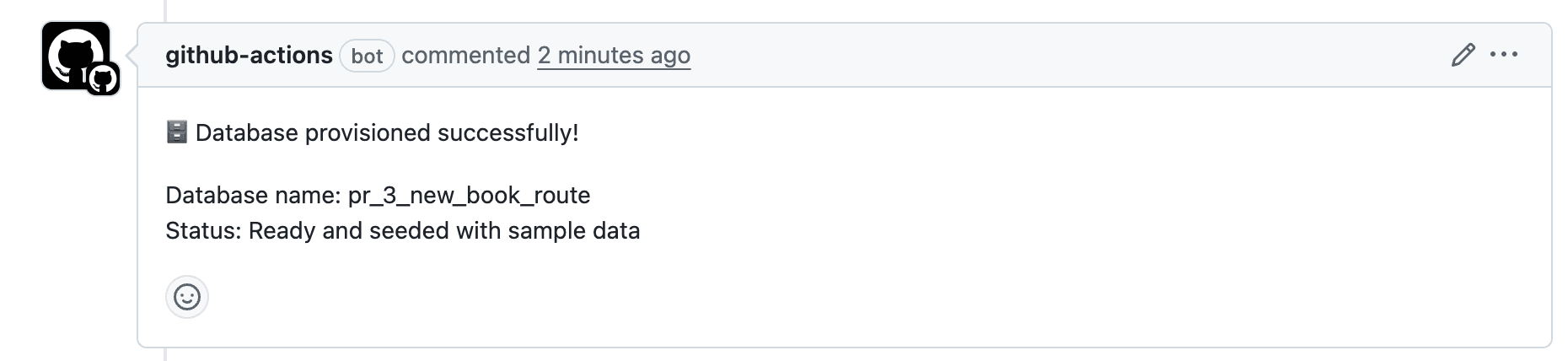
After the PR is closed, the database is automatically deleted. This allows you to test changes in isolation without affecting the main development database.
Make sure you have the following:
- Node.js 20 or later
- A Prisma Data Platform account
- GitHub repository
Initialize your project:
mkdir prisma-gha-demo && cd prisma-gha-demo

bun initmkdir prisma-gha-demo && cd prisma-gha-demo
pnpm initmkdir prisma-gha-demo && cd prisma-gha-demo
yarn initmkdir prisma-gha-demo && cd prisma-gha-demo
npm initIn this section, you'll set up Prisma in your project and verify that it works locally before integrating it into GitHub Actions. This involves installing Prisma's dependencies, connecting to a Prisma Postgres database, defining your data models, applying your schema, and seeding the database with sample data.
By the end of this section, your project will be fully prepared to use Prisma both locally and in a CI workflow.
To get started with Prisma, install the required dependencies:
bun add prisma@prev tsx @types/pg dotenv --devpnpm add prisma@prev tsx @types/pg dotenv --save-devyarn add prisma@prev tsx @types/pg dotenv --devnpm install prisma@prev tsx @types/pg dotenv --save-devbun add @prisma/client@7 @prisma/adapter-pg pgpnpm add @prisma/client@7 @prisma/adapter-pg pgyarn add @prisma/client@7 @prisma/adapter-pg pgnpm install @prisma/client@7 @prisma/adapter-pg pg[!NOTE] If you are using a different database provider (MySQL, SQL Server, SQLite), install the corresponding driver adapter package instead of
@prisma/adapter-pg. For more information, see Database drivers.
Once installed, initialize Prisma:
Once installed, initialize Prisma:
bunx --bun prisma init --output ../src/generated/prismapnpm prisma init --output ../src/generated/prismayarn prisma init --output ../src/generated/prismanpx prisma init --output ../src/generated/prismaThis creates:
- A
prisma/directory withschema.prisma - A
.envfile withDATABASE_URL - A generated client in
src/generated/prisma
Create a Prisma Postgres database and replace the generated DATABASE_URL in your .env file with the postgres://... connection string from the CLI output:
bunx create-dbpnpm dlx create-dbyarn dlx create-dbnpx create-dbEdit prisma/schema.prisma to:
generator client {

  provider = "prisma-client"

  output   = "../src/generated/prisma"

}

datasource db {

  provider = "postgresql"

}

model User {

  id    Int     @id @default(autoincrement())

  email String  @unique

  name  String?

  posts Post[]

}

model Post {

  id        Int     @id @default(autoincrement())

  title     String

  content   String?

  published Boolean @default(false)

  authorId  Int

  author    User    @relation(fields: [authorId], references: [id])

}
Create a prisma.config.ts file to configure Prisma with seeding:
import "dotenv/config";

import { defineConfig, env } from "prisma/config";

export default defineConfig({

  schema: "prisma/schema.prisma",

  migrations: {

    path: "prisma/migrations",

    seed: `tsx src/seed.ts`,

  },

  datasource: {

    url: env("DATABASE_URL"),

  },

}); 2.3. Run initial migration and generate client
Section titled “2.3. Run initial migration and generate client”bunx prisma migrate dev --name initpnpm prisma generateyarn prisma generatenpx prisma generateThis pushes your schema and prepares the client.
Then generate Prisma Client:
bunx prisma generatepnpm run seed
pnpm prisma studioyarn seed
yarn prisma studionpm run seed
npx prisma studioNavigate to http://localhost:5555 and verify that the database has been seeded with sample data. Now you're ready to automate this process with GitHub Actions.
This pushes your schema and prepares the client.
Create a file at src/seed.ts:
import { PrismaClient } from "../src/generated/prisma/client";

import { PrismaPg } from "@prisma/adapter-pg";

import "dotenv/config";

const adapter = new PrismaPg({

  connectionString: process.env.DATABASE_URL!,

});

const prisma = new PrismaClient({

  adapter,

});

const userData = [

  {

    name: "Alice",

    email: "alice@prisma.io",

    posts: {

      create: [

        {

          title: "Join the Prisma Discord",

          content: "https://pris.ly/discord",

          published: true,

        },

        {

          title: "Prisma on YouTube",

          content: "https://pris.ly/youtube",

        },

      ],

    },

  },

  {

    name: "Bob",

    email: "bob@prisma.io",

    posts: {

      create: [

        {

          title: "Follow Prisma on Twitter",

          content: "https://twitter.com/prisma",

          published: true,

        },

      ],

    },

  },

];

export async function main() {

  for (const u of userData) {

    await prisma.user.create({ data: u });

  }

}

main()

  .catch(console.error)

  .finally(() => prisma.$disconnect());
Update your package.json:
{

  "name": "prisma-gha-demo",

  "version": "1.0.0",

  "description": "",

  "scripts": {

    "seed": "tsx src/seed.ts"

  },

  // other configurations...

}
Then run:
bun run seed

bunx prisma studio
Navigate to http://localhost:5555 and verify that the database has been seeded with sample data. Now you're ready to automate this process with GitHub Actions.
In this step, you will set up a GitHub Actions workflow that automatically provisions a Prisma Postgres database when a new pull request (PR) is opened. Once the PR is closed, the workflow will clean up the database.
Start by creating the required directory and file:
mkdir -p .github/workflows

touch .github/workflows/prisma-postgres-rest-api.yml
This file will contain the logic to manage databases on a per-PR basis. This GitHub Actions workflow:
- Provisions a temporary Prisma Postgres database when a PR is opened
- Seeds the database with test data
- Cleans up the database when the PR is closed
- Supports manual execution for both provisioning and cleanup
Paste the following into .github/workflows/prisma-postgres-rest-api.yml. This sets up when the workflow runs and provides required environment variables.
name: Prisma Postgres REST API Workflow

on:

  pull_request:

    types: [opened, reopened, closed]

  workflow_dispatch:

    inputs:

      action:

        description: "Action to perform"

        required: true

        default: "provision"

        type: choice

        options:

          - provision

          - cleanup

      database_name:

        description: "Database name (for testing, will be sanitized)"

        required: false

        type: string

env:

  PRISMA_POSTGRES_SERVICE_TOKEN: ${{ secrets.PRISMA_POSTGRES_SERVICE_TOKEN }}

  PRISMA_PROJECT_ID: ${{ secrets.PRISMA_PROJECT_ID }}

  # Sanitize database name once at workflow level

  DB_NAME: ${{ github.event.pull_request.number != null && format('pr-{0}-{1}', github.event.pull_request.number, github.event.pull_request.head.ref) || (inputs.database_name != '' && inputs.database_name || format('test-{0}', github.run_number)) }}

# Prevent concurrent runs of the same PR

concurrency:

  group: ${{ github.workflow }}-${{ github.ref }}

  cancel-in-progress: true
Now you will be adding the provision and cleanup jobs to this workflow. These jobs will handle the creation and deletion of Prisma Postgres databases based on the pull request events.
Now add a job to provision the database when the PR is opened or when triggered manually. The provision job:
- Installs dependencies
- Checks for existing databases
- Creates a new one if needed
- Seeds the database
- Comments on the PR with status
Append the following under the jobs: key in your workflow file:
jobs:

  provision-database:

    if: (github.event_name == 'pull_request' && github.event.action != 'closed') || (github.event_name == 'workflow_dispatch' && inputs.action == 'provision')

    runs-on: ubuntu-latest

    permissions:

      contents: read

      pull-requests: write

    timeout-minutes: 15

    steps:

      - name: Checkout

        uses: actions/checkout@v4

      - name: Setup Node.js

        uses: actions/setup-node@v4

        with:

          node-version: "22"

          cache: "npm"

      - name: Install Dependencies

        run: npm install

      - name: Validate Environment Variables

        run: |

          if [ -z "${{ env.PRISMA_POSTGRES_SERVICE_TOKEN }}" ]; then

            echo "Error: PRISMA_POSTGRES_SERVICE_TOKEN secret is not set"

            exit 1

          fi

          if [ -z "${{ env.PRISMA_PROJECT_ID }}" ]; then

            echo "Error: PRISMA_PROJECT_ID secret is not set"

            exit 1

          fi

      - name: Sanitize Database Name

        run: |

          # Sanitize the database name to match Prisma's requirements

          DB_NAME="$(echo "${{ env.DB_NAME }}" | tr '/' '_' | tr '-' '_' | tr '[:upper:]' '[:lower:]')"

          echo "DB_NAME=$DB_NAME" >> $GITHUB_ENV

      - name: Check If Database Exists

        id: check-db

        run: |

          echo "Fetching all databases..."

          RESPONSE=$(curl -s -X GET \

            -H "Authorization: Bearer ${{ env.PRISMA_POSTGRES_SERVICE_TOKEN }}" \

            -H "Content-Type: application/json" \

            "https://api.prisma.io/v1/projects/${{ env.PRISMA_PROJECT_ID }}/databases")

          echo "Looking for database with name: ${{ env.DB_NAME }}"

          # Extract database ID using jq to properly parse JSON

          DB_EXISTS=$(echo "$RESPONSE" | jq -r ".data[]? | select(.name == \"${{ env.DB_NAME }}\") | .id")

          if [ ! -z "$DB_EXISTS" ] && [ "$DB_EXISTS" != "null" ]; then

            echo "Database ${{ env.DB_NAME }} exists with ID: $DB_EXISTS."

            echo "exists=true" >> $GITHUB_OUTPUT

            echo "db-id=$DB_EXISTS" >> $GITHUB_OUTPUT

          else

            echo "No existing database found with name ${{ env.DB_NAME }}"

            echo "exists=false" >> $GITHUB_OUTPUT

          fi

      - name: Create Database

        id: create-db

        if: steps.check-db.outputs.exists != 'true'

        run: |

          echo "Creating database ${{ env.DB_NAME }}..."

          RESPONSE=$(curl -s -X POST \

            -H "Authorization: Bearer ${{ env.PRISMA_POSTGRES_SERVICE_TOKEN }}" \

            -H "Content-Type: application/json" \

            -d "{\"name\": \"${{ env.DB_NAME }}\", \"region\": \"us-east-1\"}" \

            "https://api.prisma.io/v1/projects/${{ env.PRISMA_PROJECT_ID }}/databases")

          # Check if response contains an id (success case)

          if echo "$RESPONSE" | grep -q '"id":'; then

            echo "Database created successfully"

            CONNECTION_STRING=$(echo "$RESPONSE" | jq -r '.data.connectionString')

            echo "connection-string=$CONNECTION_STRING" >> $GITHUB_OUTPUT

          else

            echo "Failed to create database"

            echo "$RESPONSE"

            exit 1

          fi

      - name: Get Connection String for Existing Database

        id: get-connection

        if: steps.check-db.outputs.exists == 'true'

        run: |

          echo "Creating new connection string for existing database..."

          CONNECTION_RESPONSE=$(curl -s -X POST \

            -H "Authorization: Bearer ${{ env.PRISMA_POSTGRES_SERVICE_TOKEN }}" \

            -H "Content-Type: application/json" \

            -d '{"name":"read_write_key"}' \

            "https://api.prisma.io/v1/databases/${{ steps.check-db.outputs.db-id }}/connections")

          CONNECTION_STRING=$(echo "$CONNECTION_RESPONSE" | jq -r '.data.connectionString')

          echo "connection-string=$CONNECTION_STRING" >> $GITHUB_OUTPUT

      - name: Setup Database Schema

        run: |

          # Get connection string from appropriate step

          if [ "${{ steps.check-db.outputs.exists }}" = "true" ]; then

            CONNECTION_STRING="${{ steps.get-connection.outputs.connection-string }}"

          else

            CONNECTION_STRING="${{ steps.create-db.outputs.connection-string }}"

          fi

          # Set the DATABASE_URL

          export DATABASE_URL="$CONNECTION_STRING"

          # Generate Prisma Client

          npx prisma generate

          # Push schema to database

          npx prisma db push

      - name: Seed Database

        run: |

          # Get connection string from appropriate step

          if [ "${{ steps.check-db.outputs.exists }}" = "true" ]; then

            CONNECTION_STRING="${{ steps.get-connection.outputs.connection-string }}"

          else

            CONNECTION_STRING="${{ steps.create-db.outputs.connection-string }}"

          fi

          # Set the DATABASE_URL environment variable for the seed script

          export DATABASE_URL="$CONNECTION_STRING"

          # Generate Prisma Client

          npx prisma generate

          # Run the seed script

          npm run seed

      - name: Comment PR

        if: success() && github.event_name == 'pull_request'

        uses: actions/github-script@v7

        env:

          DB_NAME: ${{ env.DB_NAME }}

        with:

          github-token: ${{ secrets.GITHUB_TOKEN }}

          script: |

            github.rest.issues.createComment({

              issue_number: context.issue.number,

              owner: context.repo.owner,

              repo: context.repo.repo,

              body: `🗄️ Database provisioned successfully!\n\nDatabase name: ${process.env.DB_NAME}\nStatus: Ready and seeded with sample data`

            })

      - name: Output Database Info

        if: success() && github.event_name == 'workflow_dispatch'

        run: |

          echo "🗄️ Database provisioned successfully!"

          echo "Database name: ${{ env.DB_NAME }}"

echo "Status: Ready and seeded with sample data"When a pull request is closed, you can automatically remove the associated database by adding a cleanup job. The cleanup job:
- Finds the database by name
- Deletes it from the Prisma Postgres project
- Can also be triggered manually with
action: cleanup
Append the following to your jobs: section, after the provision-database job:
cleanup-database:

  if: (github.event_name == 'pull_request' && github.event.action == 'closed') || (github.event_name == 'workflow_dispatch' && inputs.action == 'cleanup')

  runs-on: ubuntu-latest

  timeout-minutes: 5

  steps:

    - name: Checkout

      uses: actions/checkout@v4

    - name: Validate Environment Variables

      run: |

        if [ -z "${{ env.PRISMA_POSTGRES_SERVICE_TOKEN }}" ]; then

          echo "Error: PRISMA_POSTGRES_SERVICE_TOKEN secret is not set"

          exit 1

        fi

        if [ -z "${{ env.PRISMA_PROJECT_ID }}" ]; then

          echo "Error: PRISMA_PROJECT_ID secret is not set"

          exit 1

        fi

    - name: Sanitize Database Name

      run: |

        # Sanitize the database name

        DB_NAME="$(echo "${{ env.DB_NAME }}" | tr '/' '_' | tr '-' '_' | tr '[:upper:]' '[:lower:]')"

        echo "DB_NAME=$DB_NAME" >> $GITHUB_ENV

    - name: Delete Database

      run: |

        echo "Fetching all databases..."

        RESPONSE=$(curl -s -X GET \

          -H "Authorization: Bearer ${{ env.PRISMA_POSTGRES_SERVICE_TOKEN }}" \

          -H "Content-Type: application/json" \

          "https://api.prisma.io/v1/projects/${{ env.PRISMA_PROJECT_ID }}/databases")

        echo "Looking for database with name: ${{ env.DB_NAME }}"

        # Extract database ID using jq to properly parse JSON

        DB_EXISTS=$(echo "$RESPONSE" | jq -r ".data[]? | select(.name == \"${{ env.DB_NAME }}\") | .id")

        if [ ! -z "$DB_EXISTS" ] && [ "$DB_EXISTS" != "null" ]; then

          echo "Database ${{ env.DB_NAME }} exists with ID: $DB_EXISTS. Deleting..."

          DELETE_RESPONSE=$(curl -s -X DELETE \

            -H "Authorization: Bearer ${{ env.PRISMA_POSTGRES_SERVICE_TOKEN }}" \

            -H "Content-Type: application/json" \

            "https://api.prisma.io/v1/databases/$DB_EXISTS")

          echo "Delete API Response: $DELETE_RESPONSE"

          if echo "$DELETE_RESPONSE" | grep -q '"error":'; then

            ERROR_MSG=$(echo "$DELETE_RESPONSE" | jq -r '.message // "Unknown error"')

            echo "Failed to delete database: $ERROR_MSG"

            exit 1

          else

            echo "Database deletion initiated successfully"

          fi

        else

          echo "No existing database found with name ${{ env.DB_NAME }}"

        fi
This completes your Prisma Postgres management workflow setup. In the next step, you'll configure the required GitHub secrets to authenticate with the Prisma API.
Initialize a git repository and push to GitHub:
If you don't have a repository in GitHub yet, create one on GitHub. Once the repository is ready, run the following commands:
git add .

git commit -m "Initial commit with Prisma Postgres integration"

git branch -M main

git remote add origin https://github.com/<your-username>/<repository-name>.git

git push -u origin main5.1. Retrieve your Prisma Postgres service token
Section titled “5.1. Retrieve your Prisma Postgres service token”To manage Prisma Postgres databases, you also need a service token. Follow these steps to retrieve it:
- Make sure you are in the same workspace where you created your project in the last step.
- Navigate to the Settings page of your workspace and select Service Tokens.
- Click New Service Token.
- Copy the generated token and save it in your
.envfile asPRISMA_POSTGRES_SERVICE_TOKEN. This token is required for the next step's script and must also be added to your GitHub Actions secrets.
5.2 Retrieve the project ID where you want to provision Prisma Postgres databases
Section titled “5.2 Retrieve the project ID where you want to provision Prisma Postgres databases”To avoid conflicts with your development databases, you'll now create a dedicated project specifically for CI workflows. Use the following curl command to create a new Prisma Postgres project using the Prisma Postgres REST API:
curl -X POST https://api.prisma.io/v1/projects \

  -H "Authorization: Bearer $PRISMA_POSTGRES_SERVICE_TOKEN" \

  -H "Content-Type: application/json" \

-d "{\"region\": \"us-east-1\", \"name\": \"$PROJECT_NAME\"}"Replace the $PRISMA_POSTGRES_SERVICE_TOKEN with the service token and the $PROJECT_NAMEwith a name for your project (e.g.,my-gha-preview). The script will create a new Prisma Postgres project in the us-east-1 region.
The CLI output will then look like this:
{

  "data": {

    "id": "$PRISMA_PROJECT_ID",

    "type": "project",

    "name": "$PROJECT_NAME",

    "createdAt": "2025-07-15T08:35:10.546Z",

    "workspace": {

      "id": "$PRISMA_WORKSPACE_ID",

      "name": "$PRISMA_WORKSPACE_NAME"

    }

  }

}
Copy and store the $PRISMA_PROJECT_ID from the output. This is your Prisma project ID, which you will use in the next step.
To add secrets:
-
Go to your GitHub repository.
-
Navigate to Settings.
-
Click and expand the Secrets and variables section.
-
Click Actions.
-
Click New repository secret.
-
Add the following:
PRISMA_PROJECT_ID- Your Prisma project ID from the Prisma Console.PRISMA_POSTGRES_SERVICE_TOKEN- Your service token.
These secrets will be accessed in the workflow file via env.
You can test the setup in two ways:
Option 1: Automatic trigger via PR
- Open a pull request on the repository.
- GitHub Actions will provision a new Prisma Postgres database.
- It will push your schema and seed the database.
- A comment will be added to the PR confirming database creation.
- When the PR is closed, the database will be deleted automatically.
Option 2: Manual trigger
- Go to the Actions tab in your repository.
- Select the Prisma Postgres REST API Workflow on the left sidebar.
- Click the Run workflow dropdown
- Choose
provisionas the action and optionally provide a custom database name. You can also choosecleanupto delete an existing database. - Click Run workflow.
You now have a fully automated GitHub Actions setup for managing ephemeral Prisma Postgres databases.
This gives you:
- Isolated databases for every pull request.
- Automatic schema sync and seed.
- Cleanup of unused databases after merges.
Because each pull request gets its own database, changes can be tested without touching a shared development database. You can extend this by running your test suite against the provisioned database.