MongoDB
MongoDB is a document-based NoSQL database. In this guide, you will learn how to add Prisma ORM to an existing TypeScript project, connect it to MongoDB, introspect your existing database schema, and start querying with type-safe Prisma Client.
To complete this guide, you need:
- Node.js installed on your machine (see system requirements for officially supported versions)
- An existing TypeScript project with a
package.jsonfile - Access to a MongoDB 4.2+ server with a replica set deployment. We recommend using MongoDB Atlas.
Make sure you have your database connection URL (that includes your authentication credentials) at hand.
Navigate to your existing project directory and install the required dependencies:
bun add prisma@6.19.3 @types/node --dev

bun add @prisma/client@6.19.3 dotenv
pnpm add prisma@6.19.3 @types/node --save-dev
pnpm add @prisma/client@6.19.3 dotenvyarn add prisma@6.19.3 @types/node --dev
yarn add @prisma/client@6.19.3 dotenvnpm install prisma@6.19.3 @types/node --save-dev
npm install @prisma/client@6.19.3 dotenvHere's what each package does:
prisma- The Prisma CLI for running commands likeprisma init,prisma db pull, andprisma generate@prisma/client- The Prisma Client library for querying your databasedotenv- Loads environment variables from your.envfile
Set up your Prisma ORM project by creating your Prisma Schema file with the following command:
bunx --bun prisma init --datasource-provider mongodb --output ../generated/prismapnpm prisma init --datasource-provider mongodb --output ../generated/prismayarn prisma init --datasource-provider mongodb --output ../generated/prismanpx prisma init --datasource-provider mongodb --output ../generated/prismaThis command does a few things:
- Creates a
prisma/directory with aschema.prismafile containing your database connection configuration - Creates a
.envfile in the root directory for environment variables - Creates a
prisma.config.tsfile for Prisma configuration
The generated prisma.config.ts file looks like this:
import { defineConfig, env } from "prisma/config";

export default defineConfig({

  schema: "prisma/schema.prisma",

  migrations: {

    path: "prisma/migrations",

  },

  engine: "classic",

  datasource: {

    url: env("DATABASE_URL"),

  },

});
Add dotenv to prisma.config.ts so that Prisma can load environment variables from your .env file:
import "dotenv/config";

import { defineConfig, env } from "prisma/config";

export default defineConfig({

  schema: "prisma/schema.prisma",

  migrations: {

    path: "prisma/migrations",

  },

  engine: "classic",

  datasource: {

    url: env("DATABASE_URL"),

  },

});
The generated schema uses the ESM-first prisma-client generator with a custom output path:
generator client {

  provider = "prisma-client"

  output   = "../generated/prisma"

}

datasource db {

  provider = "mongodb"

  url = env("DATABASE_URL")

}Update the .env file with your MongoDB connection URL:
DATABASE_URL="mongodb+srv://username:password@cluster.mongodb.net/mydb"For MongoDB Atlas, the connection URL format is:
mongodb+srv://USERNAME:PASSWORD@CLUSTER.mongodb.net/DATABASESelf-hosted MongoDB connection URL format:
mongodb://USERNAME:PASSWORD@HOST:PORT/DATABASEConnection URL components:
USERNAME: Your database user namePASSWORD: Your database user passwordHOST: The host wheremongodormongosis runningPORT: The port where your database server is running (typically27017)DATABASE: The name of your database
- Authentication failed: If you see a
SCRAM failure: Authentication failederror, add?authSource=adminto the end of your connection string. - Empty database name: If you see an
Error code 8000 (AtlasError): empty database name not allowederror, append the database name to your connection URL. See this GitHub issue for details.
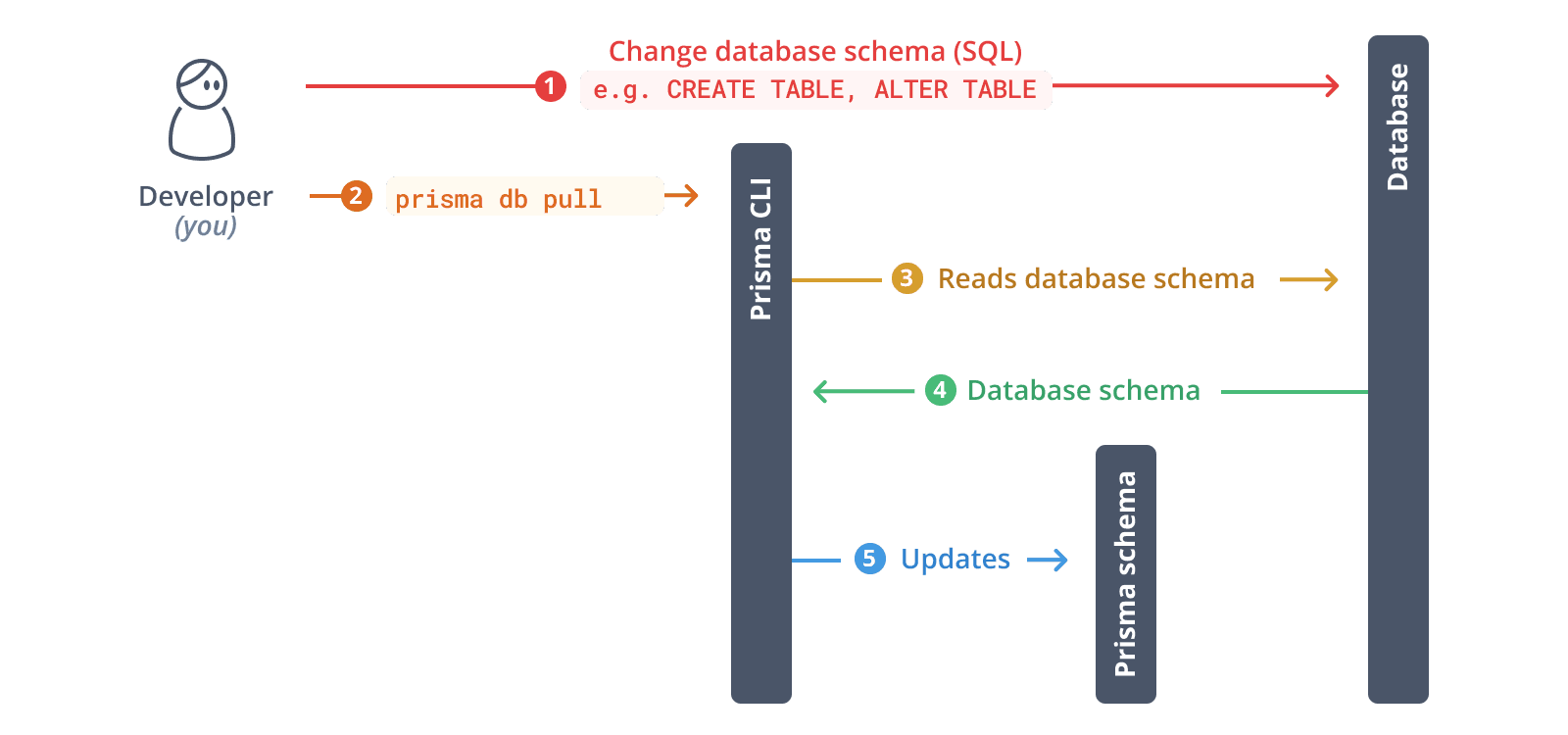
Run the following command to introspect your existing database:
bunx prisma db pullpnpm prisma db pullyarn prisma db pullnpx prisma db pullThis command:
- Reads the
DATABASE_URLfrom your.envfile - Connects to your MongoDB database
- Samples documents in your collections to infer the schema
- Generates Prisma models in your
schema.prismafile
Generate Prisma Client based on your introspected schema:
bunx prisma generatepnpm prisma generateyarn prisma generatenpx prisma generateThis creates a type-safe Prisma Client tailored to your database schema in the generated/prisma directory.
Create a utility file to instantiate Prisma Client:
import "dotenv/config";

import { PrismaClient } from "../generated/prisma/client";

const prisma = new PrismaClient();

export { prisma };Now you can use Prisma Client to query your database. Create a script.ts file:
import { prisma } from "./lib/prisma";

async function main() {

  // Example: Fetch all records from a collection

  // Replace 'user' with your actual model name

  const allUsers = await prisma.user.findMany();

  console.log("All users:", JSON.stringify(allUsers, null, 2));

}

main()

  .then(async () => {

    await prisma.$disconnect();

  })

  .catch(async (e) => {

    console.error(e);

    await prisma.$disconnect();

    process.exit(1);

  });
Run the script:
bunx tsx script.tspnpm dlx tsx script.tsyarn dlx tsx script.tsnpx tsx script.tsMongoDB doesn't support migrations like relational databases. Instead, use db push to sync schema changes:
Modify your Prisma schema file with the changes you want. For example, add a new model:
model Post {

  id        String   @id @default(auto()) @map("_id") @db.ObjectId

  title     String

  content   String?

  published Boolean  @default(false)

  authorId  String   @db.ObjectId

  author    User     @relation(fields: [authorId], references: [id])

}

model User {

  id    String @id @default(auto()) @map("_id") @db.ObjectId

  email String @unique

  name  String?

  posts Post[]

} bunx prisma db pushpnpm prisma db pushyarn prisma db pushnpx prisma db pushThis command:
- Applies schema changes to your MongoDB database
- Automatically regenerates Prisma Client
You can use MongoDB Atlas, the MongoDB shell, or MongoDB Compass to view and manage your data.
Prisma ORM is set up. These are the pages you are most likely to need next:
- Learn more about Prisma Client: Explore the Prisma Client API for advanced querying, filtering, and relations
- Database migrations: Learn about Prisma Migrate for evolving your database schema
- Performance optimization: Discover query optimization techniques
- Build a full application: Check out our framework guides to integrate Prisma ORM with Next.js, Express, and more
- Join the community: Connect with other developers on Discord