SQLite
SQLite is a lightweight, file-based database suited to development, prototyping, and small applications. It requires no setup and stores data in a local file. In this guide, you will learn how to add Prisma ORM to an existing TypeScript project, connect it to SQLite, introspect your existing database schema, and start querying with type-safe Prisma Client.
Navigate to your existing project directory and install the required dependencies:
bun add prisma@prev @types/node @types/better-sqlite3 --dev

bun add @prisma/client@7 @prisma/adapter-better-sqlite3 dotenv
pnpm add prisma@prev @types/node @types/better-sqlite3 --save-dev
pnpm add @prisma/client@7 @prisma/adapter-better-sqlite3 dotenvyarn add prisma@prev @types/node @types/better-sqlite3 --dev
yarn add @prisma/client@7 @prisma/adapter-better-sqlite3 dotenvnpm install prisma@prev @types/node @types/better-sqlite3 --save-dev
npm install @prisma/client@7 @prisma/adapter-better-sqlite3 dotenvHere's what each package does:
prisma- The Prisma CLI for running commands likeprisma init,prisma db pull, andprisma generate@prisma/client- The Prisma Client library for querying your database@prisma/adapter-better-sqlite3- The SQLite driver adapter that connects Prisma Client to your database@types/better-sqlite3- TypeScript type definitions for better-sqlite3dotenv- Loads environment variables from your.envfile
Set up your Prisma ORM project by creating your Prisma Schema file with the following command:
bunx --bun prisma init --datasource-provider sqlite --output ../generated/prismapnpm prisma init --datasource-provider sqlite --output ../generated/prismayarn prisma init --datasource-provider sqlite --output ../generated/prismanpx prisma init --datasource-provider sqlite --output ../generated/prismaThis command does a few things:
- Creates a
prisma/directory with aschema.prismafile containing your database connection configuration - Creates a
.envfile in the root directory for environment variables - Creates a
prisma7.config.tsfile for Prisma configuration
The generated prisma7.config.ts file looks like this:
// This file was generated by Prisma, and assumes you have installed the following:

// npm install --save-dev prisma dotenv

import "dotenv/config";

import { defineConfig } from "prisma/config";

export default defineConfig({

  schema: "prisma/schema.prisma",

  migrations: {

    path: "prisma/migrations",

  },

  datasource: {

    url: process.env["DATABASE_URL"],

  },

});The generated schema uses the ESM-first prisma-client generator with a custom output path:
generator client {

  provider = "prisma-client"

  output   = "../generated/prisma"

}

datasource db {

  provider = "sqlite"

}
A .env file should be created with the following value:
DATABASE_URL="file:./dev.db"Update the .env file to point to your existing SQLite database file:
DATABASE_URL="file:./path/to/your/database.db"Run the following command to introspect your existing database:
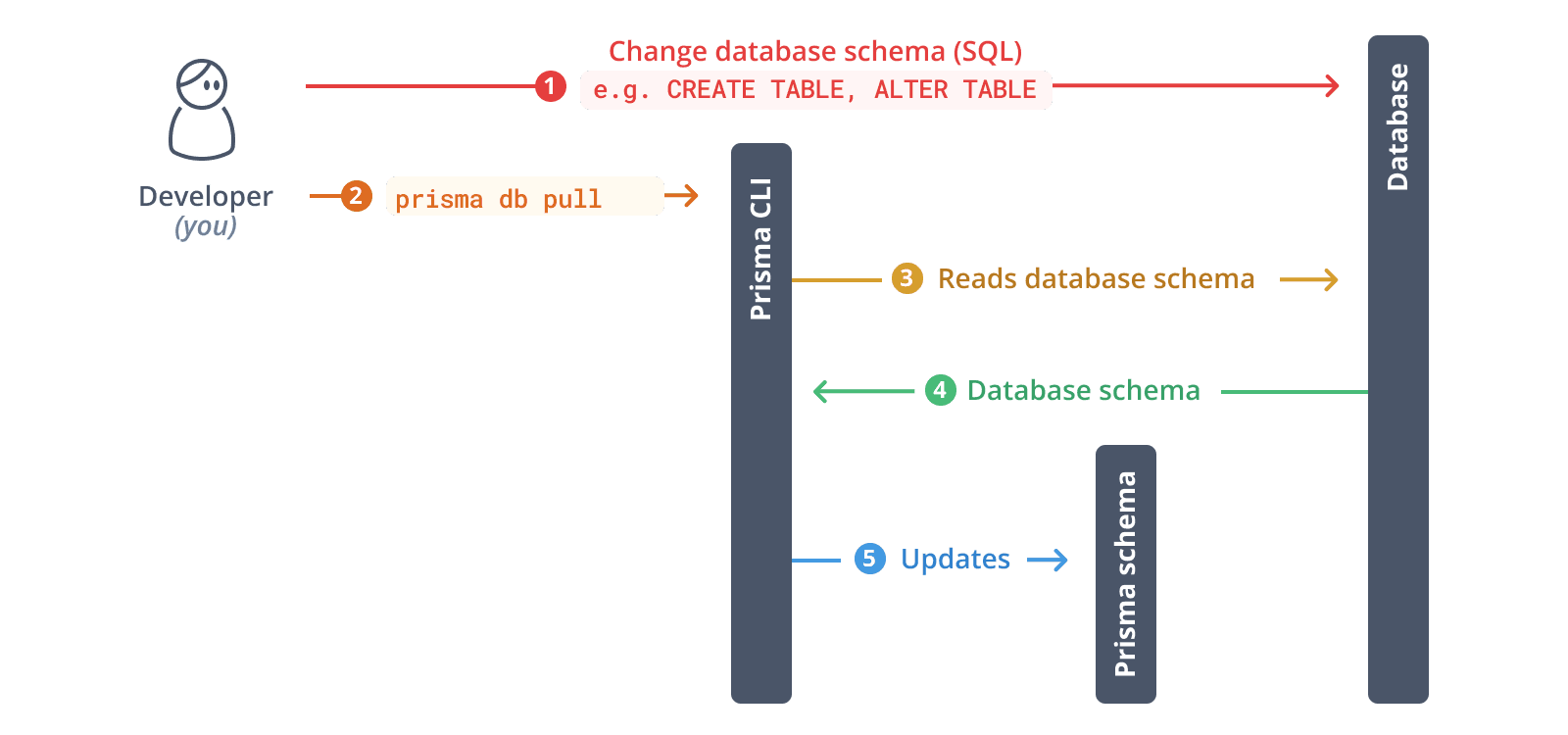
bunx prisma db pullpnpm prisma db pullyarn prisma db pullnpx prisma db pullThis command reads the DATABASE_URL environment variable, connects to your database, and introspects the database schema. It then translates the database schema from SQL into a data model in your Prisma schema.

After introspection, your Prisma schema will contain models that represent your existing database tables.
This command reads the DATABASE_URL environment variable, connects to your database, and introspects the database schema. It then translates the database schema from SQL into a data model in your Prisma schema.
After introspection, your Prisma schema will contain models that represent your existing database tables.
To use Prisma Migrate with your existing database, you need to baseline your database.
First, create a migrations directory:
mkdir -p prisma/migrations/0_initNext, generate the migration file with prisma migrate diff:
bunx prisma migrate diff --from-empty --to-schema prisma/schema.prisma --script > prisma/migrations/0_init/migration.sqlpnpm prisma migrate diff --from-empty --to-schema prisma/schema.prisma --script > prisma/migrations/0_init/migration.sqlyarn prisma migrate diff --from-empty --to-schema prisma/schema.prisma --script > prisma/migrations/0_init/migration.sqlnpx prisma migrate diff --from-empty --to-schema prisma/schema.prisma --script > prisma/migrations/0_init/migration.sqlReview the generated migration file to ensure it matches your database schema.
Then, mark the migration as applied:
bunx prisma migrate resolve --applied 0_initpnpm prisma migrate resolve --applied 0_inityarn prisma migrate resolve --applied 0_initnpx prisma migrate resolve --applied 0_initYou now have a baseline for your current database schema.
Generate Prisma Client based on your introspected schema:
bunx prisma generatepnpm prisma generateyarn prisma generatenpx prisma generateThis creates a type-safe Prisma Client tailored to your database schema in the generated/prisma directory.
Create a utility file to instantiate Prisma Client. You need to pass an instance of the Prisma ORM driver adapter adapter to the PrismaClient constructor:
import "dotenv/config";

import { PrismaBetterSqlite3 } from "@prisma/adapter-better-sqlite3";

import { PrismaClient } from "../generated/prisma/client";

const connectionString = `${process.env.DATABASE_URL}`;

const adapter = new PrismaBetterSqlite3({ url: connectionString });

const prisma = new PrismaClient({ adapter });

export { prisma };Bun doesn't support the native SQLite driver that better-sqlite3 relies on (see the node:sqlite reference). When targeting Bun, use the @prisma/adapter-libsql adapter instead:
import "dotenv/config";

import { PrismaLibSql } from "@prisma/adapter-libsql";

import { PrismaClient } from "../generated/prisma/client";

const adapter = new PrismaLibSql({

  url: process.env.DATABASE_URL ?? "",

});

const prisma = new PrismaClient({ adapter });

export { prisma };Now you can use Prisma Client to query your database. Create a script.ts file:
import { prisma } from "./lib/prisma";

async function main() {

  // Example: Fetch all records from a table

  // Replace 'user' with your actual model name

  const allUsers = await prisma.user.findMany();

  console.log("All users:", JSON.stringify(allUsers, null, 2));

}

main()

  .then(async () => {

    await prisma.$disconnect();

  })

  .catch(async (e) => {

    console.error(e);

    await prisma.$disconnect();

    process.exit(1);

  });
Run the script:
bunx tsx script.tspnpm dlx tsx script.tsyarn dlx tsx script.tsnpx tsx script.tsTo make changes to your database schema:
Update your Prisma schema file to reflect the changes you want to make to your database schema. For example, add a new model:
model Post {

  id        Int      @id @default(autoincrement())

  title     String

  content   String?

  published Boolean  @default(false)

  authorId  Int

  author    User     @relation(fields: [authorId], references: [id])

}

model User {

  id    Int    @id @default(autoincrement())

  email String @unique

  name  String?

  posts Post[]

} bunx prisma migrate dev --name your_migration_namepnpm prisma migrate dev --name your_migration_nameyarn prisma migrate dev --name your_migration_namenpx prisma migrate dev --name your_migration_nameThis command will:
- Create a new SQL migration file
- Apply the migration to your database
- Regenerate Prisma Client
-
File paths must have a
file:protocol right now in the database URL for SQLite -
Node.js 22.5+: Works out of the box with the built-in
node:sqlitemodule- May require
NODE_OPTIONS=--experimental-sqliteenvironment variable
- May require
-
Node.js 20: Requires installing
better-sqlite3as a dependency- If using pnpm 10+ with
pnpx, you'll need the--allow-build=better-sqlite3flag
- If using pnpm 10+ with
-
Deno >= 2.2: Supported via built-in SQLite module
-
Bun: Support for Prisma Studio with SQLite is coming soon and is not available yet
If you don't have node:sqlite available in your runtime or prefer not to install better-sqlite3 as a hard dependency (it adds ~10MB), you can use npx to temporarily install the required packages:
bunx -p better-sqlite3 -p prisma prisma studio --url file:./path/to/your/database.dbpnpm dlx -p better-sqlite3 -p prisma prisma studio --url file:./path/to/your/database.dbyarn dlx -p better-sqlite3 -p prisma prisma studio --url file:./path/to/your/database.dbnpx -p better-sqlite3 -p prisma prisma studio --url file:./path/to/your/database.dbThis command:
- Temporarily installs
better-sqlite3without adding it to your project dependencies - Runs Prisma Studio with the specified SQLite database file
- Avoids the 10MB overhead of
better-sqlite3in your project