Integration testing
Integration tests focus on testing how separate parts of the program work together. In the context of applications using a database, integration tests usually require a database to be available and contain data that is convenient to the scenarios intended to be tested.
One way to simulate a real world environment is to use Docker to encapsulate a database and some test data. This can be spun up and torn down with the tests and so operate as an isolated environment away from your production databases.
Note: Prisma's testing series offers a more detailed walkthrough of setting up integration tests against a real database if you want a deeper companion resource.
This guide assumes you have Docker and Docker Compose installed on your machine as well as Jest setup in your project.
The following ecommerce schema will be used throughout the guide. This varies from the traditional User and Post models used in other parts of the docs, mainly because it is unlikely you will be running integration tests against your blog.
Ecommerce schema
// Can have 1 customer

// Can have many order details

model CustomerOrder {

  id           Int            @id @default(autoincrement())

  createdAt    DateTime       @default(now())

  customer     Customer       @relation(fields: [customerId], references: [id])

  customerId   Int

  orderDetails OrderDetails[]

}

// Can have 1 order

// Can have many products

model OrderDetails {

  id        Int           @id @default(autoincrement())

  products  Product       @relation(fields: [productId], references: [id])

  productId Int

  order     CustomerOrder @relation(fields: [orderId], references: [id])

  orderId   Int

  total     Decimal

  quantity  Int

}

// Can have many order details

// Can have 1 category

model Product {

  id           Int            @id @default(autoincrement())

  name         String

  description  String

  price        Decimal

  sku          Int

  orderDetails OrderDetails[]

  category     Category       @relation(fields: [categoryId], references: [id])

  categoryId   Int

}

// Can have many products

model Category {

  id       Int       @id @default(autoincrement())

  name     String

  products Product[]

}

// Can have many orders

model Customer {

  id      Int             @id @default(autoincrement())

  email   String          @unique

  address String?

  name    String?

  orders  CustomerOrder[]

}
The guide uses a singleton pattern for Prisma Client setup. Refer to the singleton docs for a walk through of how to set that up.
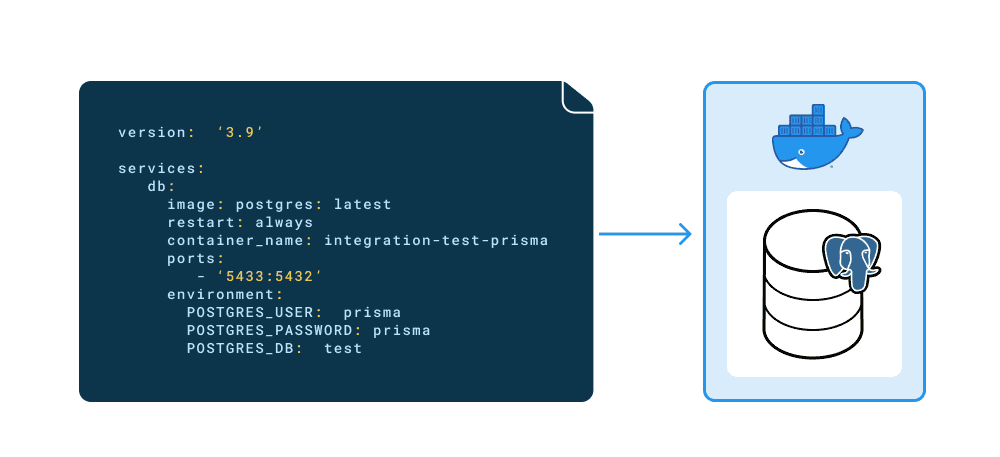
With Docker and Docker compose both installed on your machine you can use them in your project.
- Begin by creating a
docker-compose.ymlfile at your projects root. Here you will add a Postgres image and specify the environments credentials.
# Set the version of docker compose to use

version: "3.9"

# The containers that compose the project

services:

  db:

    image: postgres:13

    restart: always

    container_name: integration-tests-prisma

    ports:

      - "5433:5432"

    environment:

      POSTGRES_USER: prisma

      POSTGRES_PASSWORD: prisma

POSTGRES_DB: testsNote: The compose version used here (
3.9) is the latest at the time of writing, if you are following along be sure to use the same version for consistency.
The docker-compose.yml file defines the following:
- The Postgres image (
postgres) and version tag (:13). This will be downloaded if you do not have it locally available. - The port
5433is mapped to the internal (Postgres default) port5432. This will be the port number the database is exposed on externally. - The database user credentials are set and the database given a name.
- To connect to the database in the container, create a new connection string with the credentials defined in the
docker-compose.ymlfile. For example:
DATABASE_URL="postgresql://prisma:prisma@localhost:5433/tests"- To create the container in a detached state so that you can continue to use the terminal tab, run the following command:
docker compose up -d-
Next you can check that the database has been created by executing a
psqlcommand inside the container. Make a note of the container id.docker psCONTAINER ID IMAGE COMMAND CREATED STATUS PORTS NAMES 1322e42d833f postgres:13 "docker-entrypoint.s…" 2 seconds ago Up 1 second 0.0.0.0:5433->5432/tcp integration-tests-prisma
Note: The container id is unique to each container, you will see a different id displayed.
-
Using the container id from the previous step, run
psqlin the container, login with the created user and check the database is created:docker exec -it 1322e42d833f psql -U prisma teststests=# \l List of databases Name | Owner | Encoding | Collate | Ctype | Access privileges postgres | prisma | UTF8 | en_US.utf8 | en_US.utf8 | template0 | prisma | UTF8 | en_US.utf8 | en_US.utf8 | =c/prisma + | | | | | prisma=CTc/prisma template1 | prisma | UTF8 | en_US.utf8 | en_US.utf8 | =c/prisma + | | | | | prisma=CTc/prisma tests | prisma | UTF8 | en_US.utf8 | en_US.utf8 | (4 rows)
Integration tests will be run against a database in a dedicated test environment instead of the production or development environments.
The flow for running said tests goes as follows:
- Start the container and create the database
- Migrate the schema
- Run the tests
- Destroy the container
Each test suite will seed the database before all the test are run. After all the tests in the suite have finished, the data from all the tables will be dropped and the connection terminated.
The ecommerce application you are testing has a function which creates an order. This function does the following:
- Accepts input about the customer making the order
- Accepts input about the product being ordered
- Checks if the customer has an existing account
- Checks if the product is in stock
- Returns an "Out of stock" message if the product doesn't exist
- Creates an account if the customer doesn't exist in the database
- Create the order
An example of how such a function might look can be seen below:
import prisma from "../client";

export interface Customer {

  id?: number;

  name?: string;

  email: string;

  address?: string;

}

export interface OrderInput {

  customer: Customer;

  productId: number;

  quantity: number;

}

/**

 * Creates an order with customer.

 * @param input The order parameters

 */

export async function createOrder(input: OrderInput) {

  const { productId, quantity, customer } = input;

  const { name, email, address } = customer;

  // Get the product

  const product = await prisma.product.findUnique({

    where: {

      id: productId,

    },

  });

  // If the product is null its out of stock, return error.

  if (!product) return new Error("Out of stock");

  // If the customer is new then create the record, otherwise connect via their unique email

  await prisma.customerOrder.create({

    data: {

      customer: {

        connectOrCreate: {

          create: {

            name,

            email,

            address,

          },

          where: {

            email,

          },

        },

      },

      orderDetails: {

        create: {

          total: product.price,

          quantity,

          products: {

            connect: {

              id: product.id,

            },

          },

        },

      },

    },

  });

}
The following tests will check if the createOrder function works as it should do. They will test:
- Creating a new order with a new customer
- Creating an order with an existing customer
- Show an "Out of stock" error message if a product doesn't exist
Before the test suite is run the database is seeded with data. After the test suite has finished a deleteMany is used to clear the database of its data.
import prisma from "../src/client";

import { createOrder, Customer, OrderInput } from "../src/functions";

beforeAll(async () => {

  // create product categories

  await prisma.category.createMany({

    data: [{ name: "Wand" }, { name: "Broomstick" }],

  });

  console.log("✨ 2 categories successfully created!");

  // create products

  await prisma.product.createMany({

    data: [

      {

        name: 'Holly, 11", phoenix feather',

        description: "Harry Potters wand",

        price: 100,

        sku: 1,

        categoryId: 1,

      },

      {

        name: "Nimbus 2000",

        description: "Harry Potters broom",

        price: 500,

        sku: 2,

        categoryId: 2,

      },

    ],

  });

  console.log("✨ 2 products successfully created!");

  // create the customer

  await prisma.customer.create({

    data: {

      name: "Harry Potter",

      email: "harry@hogwarts.io",

      address: "4 Privet Drive",

    },

  });

  console.log("✨ 1 customer successfully created!");

});

afterAll(async () => {

  const deleteOrderDetails = prisma.orderDetails.deleteMany();

  const deleteProduct = prisma.product.deleteMany();

  const deleteCategory = prisma.category.deleteMany();

  const deleteCustomerOrder = prisma.customerOrder.deleteMany();

  const deleteCustomer = prisma.customer.deleteMany();

  await prisma.$transaction([

    deleteOrderDetails,

    deleteProduct,

    deleteCategory,

    deleteCustomerOrder,

    deleteCustomer,

  ]);

  await prisma.$disconnect();

});

it("should create 1 new customer with 1 order", async () => {

  // The new customers details

  const customer: Customer = {

    id: 2,

    name: "Hermione Granger",

    email: "hermione@hogwarts.io",

    address: "2 Hampstead Heath",

  };

  // The new orders details

  const order: OrderInput = {

    customer,

    productId: 1,

    quantity: 1,

  };

  // Create the order and customer

  await createOrder(order);

  // Check if the new customer was created by filtering on unique email field

  const newCustomer = await prisma.customer.findUnique({

    where: {

      email: customer.email,

    },

  });

  // Check if the new order was created by filtering on unique email field of the customer

  const newOrder = await prisma.customerOrder.findFirst({

    where: {

      customer: {

        email: customer.email,

      },

    },

  });

  // Expect the new customer to have been created and match the input

  expect(newCustomer).toEqual(customer);

  // Expect the new order to have been created and contain the new customer

  expect(newOrder).toHaveProperty("customerId", 2);

});

it("should create 1 order with an existing customer", async () => {

  // The existing customers email

  const customer: Customer = {

    email: "harry@hogwarts.io",

  };

  // The new orders details

  const order: OrderInput = {

    customer,

    productId: 1,

    quantity: 1,

  };

  // Create the order and connect the existing customer

  await createOrder(order);

  // Check if the new order was created by filtering on unique email field of the customer

  const newOrder = await prisma.customerOrder.findFirst({

    where: {

      customer: {

        email: customer.email,

      },

    },

  });

  // Expect the new order to have been created and contain the existing customer with an id of 1 (Harry Potter from the seed script)

  expect(newOrder).toHaveProperty("customerId", 1);

});

it("should show 'Out of stock' message if productId doesn't exit", async () => {

  // The existing customers email

  const customer: Customer = {

    email: "harry@hogwarts.io",

  };

  // The new orders details

  const order: OrderInput = {

    customer,

    productId: 3,

    quantity: 1,

  };

  // The productId supplied doesn't exit so the function should return an "Out of stock" message

  await expect(createOrder(order)).resolves.toEqual(new Error("Out of stock"));

});This setup isolates a real world scenario so that you can test your applications functionality against real data in a controlled environment.
You can add some scripts to your projects package.json file which will setup the database and run the tests, then afterwards manually destroy the container.
  "scripts": {

    "docker:up": "docker compose up -d",

    "docker:down": "docker compose down",

    "test": "yarn docker:up && yarn prisma migrate deploy && jest -i"

  },
The test script does the following:
- Runs
docker compose up -dto create the container with the Postgres image and database. - Applies the migrations found in
./prisma/migrations/directory to the database, this creates the tables in the container's database. - Executes the tests.
Once you are satisfied you can run yarn docker:down to destroy the container, its database and any test data.