Relations
A relation is a connection between two models in the Prisma schema. For example, there is a one-to-many relation between User and Post because one user can have many blog posts:
model User {

  id    Int    @id @default(autoincrement())

  posts Post[]

}

model Post {

  id       Int  @id @default(autoincrement())

  author   User @relation(fields: [authorId], references: [id])

  authorId Int  // Foreign key connecting Post to User

  title    String

}
At a Prisma ORM level, the User / Post relation consists of:
- Relation fields (
authorandposts): Define connections at Prisma ORM level, do not exist in the database - Relation scalar field (
authorId): The foreign key that exists in the database
In SQL, you use a foreign key to create a relation between two tables:
- A foreign key column (
authorId) inPostreferences the primary key (id) inUser
author User @relation(fields: [authorId], references: [id])MongoDB uses a normalized data model design where documents reference each other by ID:
// User document

{ "_id": { "$oid": "60d5922d00581b8f0062e3a8" }, "name": "Ella" }

// Post documents referencing the user

{ "_id": "...", "title": "How to make sushi", "authorId": { "$oid": "60d5922d00581b8f0062e3a8" } }
If using ObjectId, add @db.ObjectId to both the model ID and relation scalar field:
model Post {

  id       String @id @default(auto()) @map("_id") @db.ObjectId

  author   User   @relation(fields: [authorId], references: [id])

  authorId String @db.ObjectId

}const userAndPosts = await prisma.user.create({
data: {
posts: {
create: [{ title: "Prisma Day 2020" }, { title: "How to write a Prisma schema" }],
},
},
});const getAuthor = await prisma.user.findUnique({
where: { id: "20" },
include: { posts: true },
});await prisma.user.update({
where: { id: 20 },
data: {
posts: { connect: { id: 4 } },
},
});There are three different types (or cardinalities of relations in Prisma ORM:
- One-to-one (also called 1-1 relations)
- One-to-many (also called 1-n relations)
- Many-to-many (also called m-n relations)
The following Prisma schema includes every type of relation:
- one-to-one:
User↔Profile - one-to-many:
User↔Post - many-to-many:
Post↔Category
model User {

  id      Int      @id @default(autoincrement())

  posts   Post[]

  profile Profile?

}

model Profile {

  id     Int  @id @default(autoincrement())

  user   User @relation(fields: [userId], references: [id])

  userId Int  @unique // relation scalar field (used in the `@relation` attribute above)

}

model Post {

  id         Int        @id @default(autoincrement())

  author     User       @relation(fields: [authorId], references: [id])

  authorId   Int // relation scalar field  (used in the `@relation` attribute above)

  categories Category[]

}

model Category {

  id    Int    @id @default(autoincrement())

  posts Post[]

}model User {
id String @id @default(auto()) @map("_id") @db.ObjectId
posts Post[]
profile Profile?
}
model Profile {
id String @id @default(auto()) @map("_id") @db.ObjectId
user User @relation(fields: [userId], references: [id])
userId String @unique @db.ObjectId // relation scalar field (used in the `@relation` attribute above)
}
model Post {
id String @id @default(auto()) @map("_id") @db.ObjectId
author User @relation(fields: [authorId], references: [id])
authorId String @db.ObjectId // relation scalar field (used in the `@relation` attribute above)
categories Category[] @relation(fields: [categoryIds], references: [id])
categoryIds String[] @db.ObjectId
}
model Category {
id String @id @default(auto()) @map("_id") @db.ObjectId
posts Post[] @relation(fields: [postIds], references: [id])
postIds String[] @db.ObjectId
}[!NOTE] This schema is the same as the example data model but has all scalar fields removed (except for the required relation scalar fields) so you can focus on the relation fields.
[!NOTE] This example uses implicit many-to-many relations. These relations do not require the
@relationattribute unless you need to disambiguate relations.
Notice that the syntax is slightly different between relational databases and MongoDB - particularly for many-to-many relations.
For relational databases, the following entity relationship diagram represents the database that corresponds to the sample Prisma schema:

For MongoDB, Prisma ORM uses a normalized data model design, which means that documents reference each other by ID in a similar way to relational databases. See the MongoDB section for more details.
Notice that the syntax is slightly different between relational databases and MongoDB - particularly for many-to-many relations.
For relational databases, the following entity relationship diagram represents the database that corresponds to the sample Prisma schema:
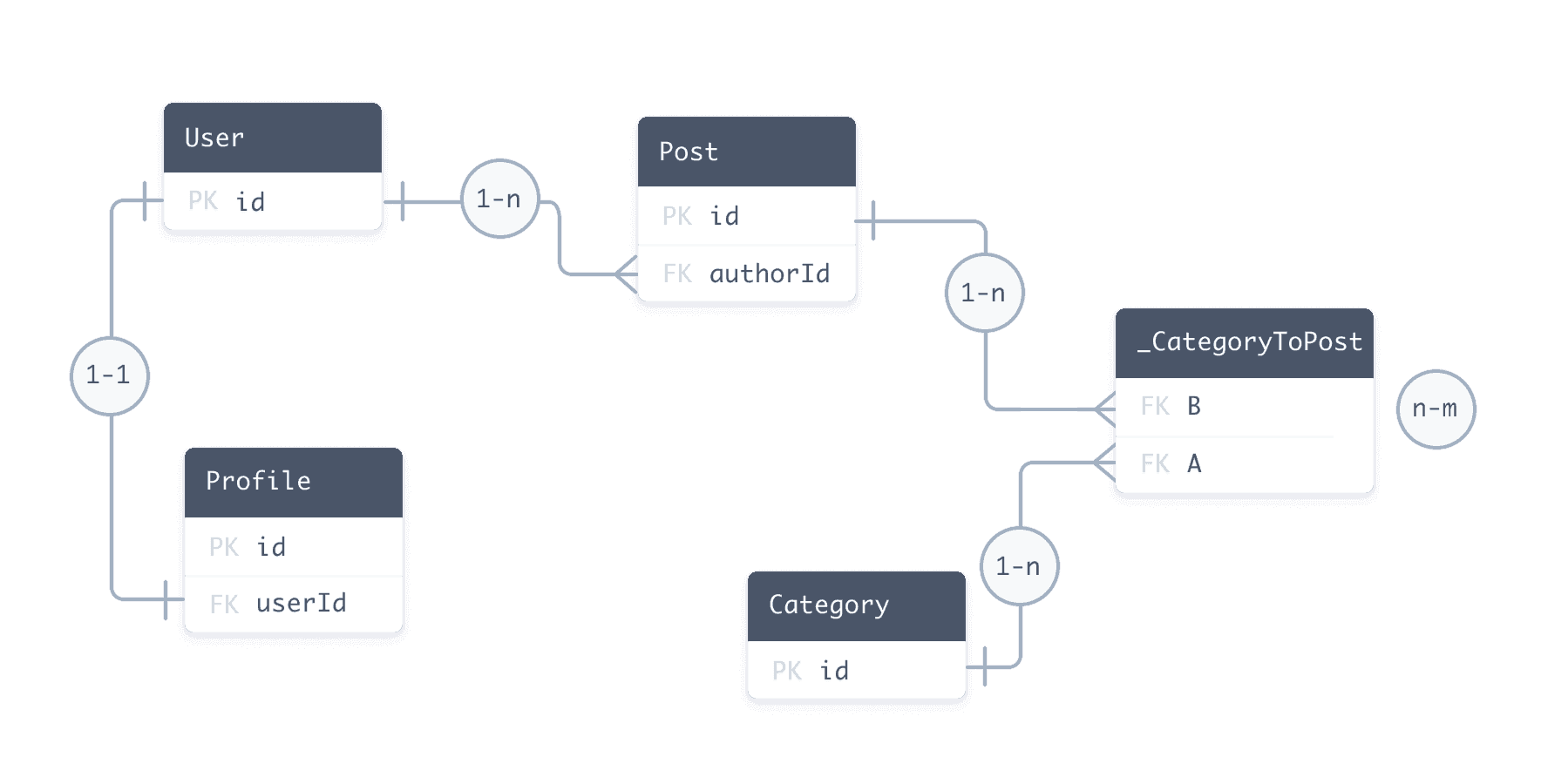
For MongoDB, Prisma ORM uses a normalized data model design, which means that documents reference each other by ID in a similar way to relational databases. See the MongoDB section for more details.
Implicit and explicit many-to-many relations
Section titled “Implicit and explicit many-to-many relations”Many-to-many relations in relational databases can be modelled in two ways:
- explicit many-to-many relations, where the relation table is represented as an explicit model in your Prisma schema
- implicit many-to-many relations, where Prisma ORM manages the relation table and it does not appear in the Prisma schema.
Implicit many-to-many relations require both models to have a single @id. Be aware of the following:
- You cannot use a multi-field ID
- You cannot use a
@uniquein place of an@id
To use either of these features, you must set up an explicit many-to-many instead.
The implicit many-to-many relation still manifests in a relation table in the underlying database. However, Prisma ORM manages this relation table.
If you use an implicit many-to-many relation instead of an explicit one, it makes the Prisma Client API simpler (because, for example, you have one fewer level of nesting inside of nested writes).
If you're not using Prisma Migrate but obtain your data model from introspection, you can still make use of implicit many-to-many relations by following Prisma ORM's conventions for relation tables.
Relation fields are fields on a Prisma model whose type is another model (not a scalar type). Every relation needs exactly two relation fields, one on each model.
model User {

  id    Int    @id @default(autoincrement())

  posts Post[] // relation field

}

model Post {

  id       Int    @id @default(autoincrement())

  author   User   @relation(fields: [authorId], references: [id]) // annotated relation field

  authorId Int    // relation scalar field (foreign key)

}
Key concepts:
postsandauthorare relation fields (exist at Prisma ORM level only)authorIdis the relation scalar field (exists in the database as foreign key)
Relations annotated with @relation attribute (one-to-one, one-to-many, and many-to-many for MongoDB) represent the side that stores the foreign key:
author     User    @relation(fields: [authorId], references: [id])

authorId   Int     // relation scalar field
The references argument names the field on the other model that the relation scalar field points to. In the example above, authorId on Post holds the value of id on User, so fields lists the field on this model and references lists the field it points to on the related model.
Both arguments are lists because a relation can span more than one field. When the related model has a composite ID or a composite unique constraint, fields and references each list the same number of fields in the same order, for example @relation(fields: [firstName, lastName], references: [firstName, lastName]). The fields in references must be the related model's @id or a @unique field, or together form its @@id or @@unique. MongoDB does not support @@id, so on MongoDB the referenced fields are an @id, a @unique, or a @@unique. See the @relation reference for every argument the attribute accepts.
Naming convention: Relation scalar fields typically use the pattern fieldName + Id (e.g., author → authorId).
The @relation attribute is required when:
- Defining one-to-one or one-to-many relations
- Disambiguating multiple relations between the same models
- Defining self-relations
- Defining many-to-many relations for MongoDB
When you have two relations between the same models, use the name argument in @relation to disambiguate:
model User {

  id           Int     @id @default(autoincrement())

  writtenPosts Post[]  @relation("WrittenPosts")

  pinnedPost   Post?   @relation("PinnedPost")

}

model Post {

  id         Int     @id @default(autoincrement())

  author     User    @relation("WrittenPosts", fields: [authorId], references: [id])

  authorId   Int

  pinnedBy   User?   @relation("PinnedPost", fields: [pinnedById], references: [id])

  pinnedById Int?    @unique

}
The name must be the same on both sides of the relation.